4HTTP2SHELL: Unpatched Cacti Zero-Day Gives RCE in Four Requests via Guest Access
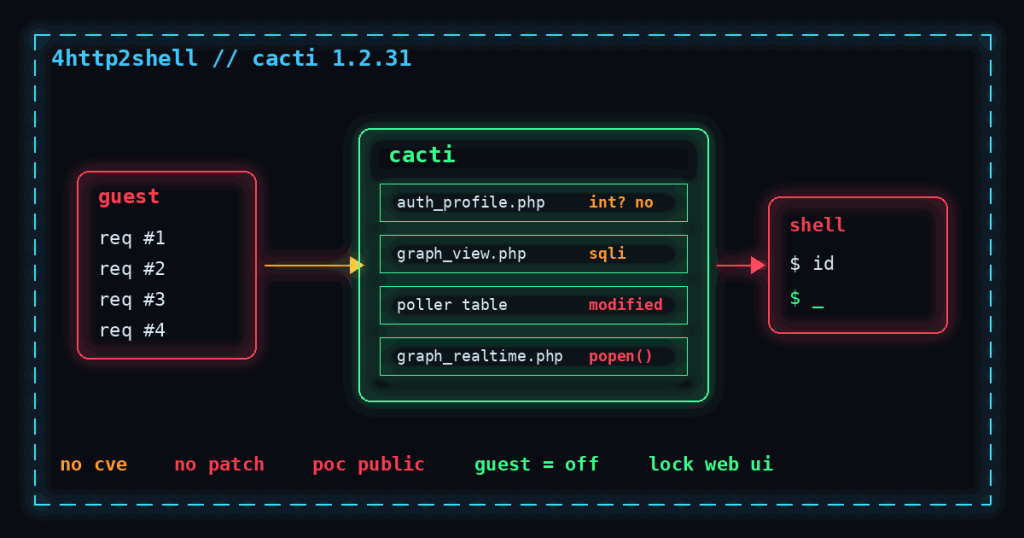
If you run Cacti to graph your switches, firewalls or homelab gear, check one setting right now: is the guest account turned on? A new zero-day nicknamed 4HTTP2SHELL (also called 4HTTP2ROOT) turns that guest account into remote code execution on the Cacti server with just four HTTP requests. There’s no patch, no CVE yet, and a proof-of-concept exploit is already public on GitHub.
The short version
- What: A second-order SQL injection that ends in command execution on the Cacti server
- Affected: Cacti 1.2.31, the current release, when the guest account is enabled
- Login needed: None beyond the guest surface. No password, no API key, no phishing.
- CVE: Not assigned yet
- Patch: None available
- Exploit: Public PoC on GitHub. No reports of in-the-wild attacks yet, but that rarely lasts once code is out.
- Found by: A researcher going by “ek0ms savi0r”
- Fix for now: Disable the guest account and keep the Cacti web UI off untrusted networks
The good news: guest access has been off by default since Cacti 0.8.7. If you never touched it, you’re likely fine. But plenty of people turn it on so coworkers or family can look at graphs without logging in, and those are the installs at risk.
How the attack works
It’s a chain of small mistakes that add up to a shell:
- Bad input gets saved. The guest user can update their own profile settings through
auth_profile.php. Cacti never checks that the “graphs per page” preview setting is actually a number, so a guest can store SQL in it. - The SQL runs later. When
graph_view.phploads with its default filters, that stored value is dropped into a query’s LIMIT clause. PHP’s PDO driver allows stacked statements there, so the attacker’s extra SQL runs too. That’s the “second-order” part: the injection is saved in one place and fires somewhere else. - The poller table gets poisoned. The injected SQL rewrites a row in Cacti’s poller table.
- Command execution.
graph_realtime.phpreads that poller row and hands it straight to PHP’spopen()with no allowlist or sanitizing. The attacker’s command runs on the server.
If graph_realtime.php and guest access sound familiar, they should. CVE-2020-8813 was a guest-reachable command injection in the same file back in Cacti 1.2.8, and 1.2.31 itself only shipped this year to fix several pre-auth SQL injections reachable through guest graph viewing. Guest access on Cacti has a long track record of being the soft spot.
Why it’s worse than “just the graphing box”
Cacti usually sits deep inside the network with reach to every device it monitors, and it often stores SNMP communities and other device credentials. watchTowr points out that an attacker who lands on it can reach far beyond the monitoring server itself. On top of that, tampering with the poller table means an attacker could quietly stop alerts from firing, so you might not notice anything is wrong.
Am I exposed? Quick checks
In the web UI, go to Console > Configuration > Settings > Authentication and look at Guest User. If it’s set to anything other than “No User,” you’re in scope.
Or check from the database (adjust the database name if yours isn’t cacti):
mysql cacti -e "SELECT name, value FROM settings WHERE name = 'guest_user';"
mysql cacti -e "SELECT id, username, enabled FROM user_auth WHERE username = 'guest';"
Also confirm your version under Console > Utilities > Technical Support or in the footer of the login page.
How to lock it down
1. Turn off guest access
Set Guest User to No User in the Authentication settings and save. Then go to Console > Users, open the guest account and uncheck Enabled. This shuts the door the whole exploit depends on. If people need to see graphs, give them real read-only accounts instead.
2. Keep the web UI off untrusted networks
Cacti should never face the internet. Limit it to your admin subnet or VPN. On Apache:
<Location /cacti>
    Require ip 192.168.0.0/24
</Location>
Or on nginx:
location /cacti {
    allow 192.168.0.0/24;
    deny all;
}
Swap in your own subnet and reload the web server. A host firewall rule on ports 80 and 443 does the job too.
3. Watch for the patch
Keep an eye on the Cacti GitHub security advisories and your distro’s package updates, and install the fix as soon as it lands. Even then, leave guest access off unless you truly need it.
Signs someone already tried
If guest was on, look for a non-numeric value stored in the preview setting, which is how the attack starts:
mysql cacti -e "SELECT user_id, value FROM settings_user
  WHERE name = 'preview_graphs_per_page' AND value NOT REGEXP '^[0-9]+$';"
Then review the poller table for anything that looks like a shell command, such as pipes, semicolons, backticks, curl, wget or bash:
mysql cacti -e "SELECT * FROM poller\G"It’s also worth searching your web server access logs for guest-session hits on auth_profile.php followed by graph_realtime.php, and checking for unexpected processes running as your web server user. If you find anything, treat the box as compromised and rotate every SNMP community and device credential Cacti had stored.
Bottom line
No patch and a public exploit is the worst combo, but the fix here takes two minutes: turn off the guest account and keep Cacti off the internet. Do that today, then patch the moment a release ships.
Sources: The Hacker News, SecurityOnline (Cacti 1.2.31 fixes), Rapid7 (CVE-2020-8813).